Access Your Bookmarks Instantly with Linkinize for Raycast
We’re excited to announce that Linkinize is now available as a Raycast extension — bringing your team’s bookmarks right to your fingertips without ever leaving your keyboard.
If you’re a Mac user who relies on Raycast for your daily workflow, you can now search, open, and manage your Linkinize bookmarks in the same place you launch apps, run scripts, and control your tools.
Why Raycast?
Raycast has become the go-to launcher for developers and power users on macOS. It’s fast, extensible, and designed around the idea that you should never have to leave your keyboard to get things done.
For teams already using Linkinize to organize and share bookmarks, having instant access through Raycast means one less browser tab to open, one less context switch in your day.
What You Can Do
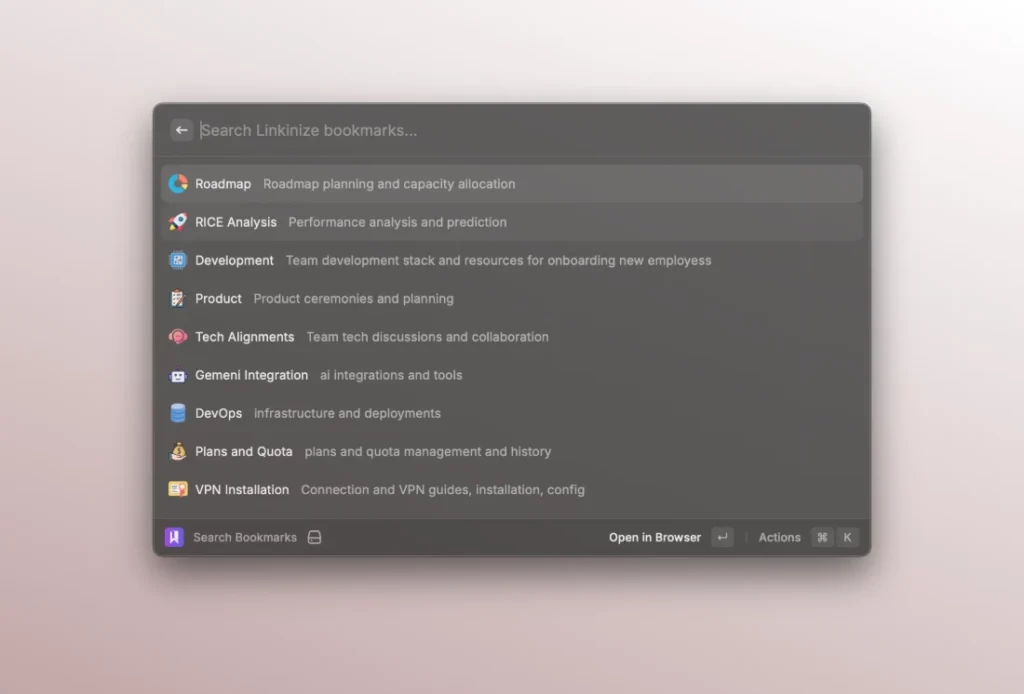
Search Bookmarks Instantly
Open Raycast, type your query, and find the bookmark you need in milliseconds. Linkinize syncs your workspace bookmarks locally, so search results appear instantly — no network delay, no waiting.
Each bookmark shows its name, description, and favicon, so you can quickly identify the right link. Hit Enter to open it in your browser, or use ⌘C to copy the URL to your clipboard.
You can also set up a global keyboard shortcut (⌘⌥L by default) to jump straight into bookmark search from anywhere on your Mac.
Switch Between Workspaces
If you work across multiple organizations or workspaces in Linkinize, the Switch Context command (⌘⌥O) lets you quickly change which workspace you’re searching. No need to open the browser or the Linkinize app — just pick your workspace and your bookmarks update automatically.
Automatic Background Sync
The extension syncs your bookmarks in the background every 30 minutes, so your local data is always up to date. You can also trigger a manual sync anytime if you’ve just added new bookmarks and want them available immediately.
Getting Started
Setting up takes less than a minute:
- Install Raycast if you haven’t already (it’s free).
- Search for “Linkinize” in the Raycast Store, or visit the extension page directly.
- Install the extension and enter your Linkinize email and password when prompted.
- That’s it — start searching with ⌘⌥L.
Smart Ranking
Bookmarks aren’t just listed alphabetically. The extension uses a relevance-based ranking system that prioritizes the links you actually use. The more you open a bookmark through Raycast, the higher it appears in your results — so your most important links are always at the top.
Built for Teams
This extension works with all Linkinize plans. Whether you’re on a personal account or part of an enterprise team with dozens of workspaces, your bookmarks are available the moment you open Raycast.
And because everything syncs from your Linkinize workspace, any bookmark added by a teammate shows up in your Raycast search automatically — no extra setup needed.
What’s Next
This is just the beginning for our Raycast integration. We’re exploring features like creating new bookmarks directly from Raycast, quick actions for tagging and organizing, and deeper workspace management — all without leaving your launcher.
Have ideas for what you’d like to see? We’d love to hear from you — reach out through our contact page or drop us a message in your Linkinize workspace.